brand-logo
  • Store
  • Blog
LoginSignup
brand-logoLoading Light/Dark Toggle
support@pokibit.com
Raise a Ticket
Privacy PolicyCookie PolicyAML Policy
Disclaimer PolicyTerms and ConditionsGrievance Redressal Policy
Return & Cancellation PolicyShipping & Delivery Policy
Pay via
UPI
PhonePay
Paytm
Gpay
Visa
Master-Card
Net-Banking

© PokiBit 2026 - Made with Love in India

  1. Blog
    1. How To Guides

How to Redeem a Multi-Pack of Roblox Gift Cards at Once

Share
1771

Published on: Sat 20-Sep-2025 04:46 PM
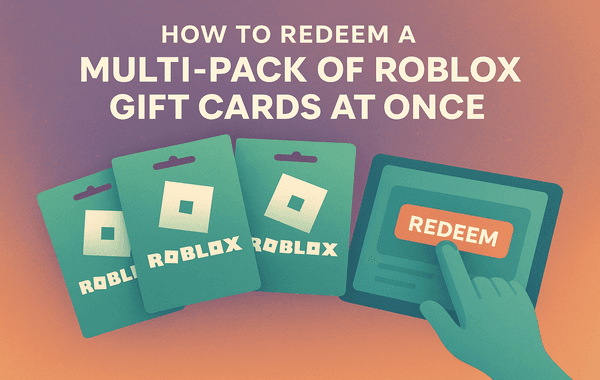
Steps to redeem multiple Roblox gift cards at once

If you’re a Roblox fan, you probably know how powerful a single gift card can be—instant Robux, premium perks, and exclusive bonuses. But what if you’ve got more than one card in your hands? Many players buy multi-packs during offers, bulk deals, or as gifts from friends. The big question is: how do you redeem a multi-pack of Roblox Gift Cards at once without confusion?

In this guide, we’ll walk you through everything you need to know—from step-by-step redemption methods to tips for maximising value. And if you’re still looking for the best place to buy Roblox Gift Cards, you can grab them instantly from Pokibit for fast, secure, and affordable purchases.

Why Multi-Packs of Roblox Gift Cards Are Popular

Roblox players, especially regular users, often go for multi-packs instead of single cards. Here’s why:

  • Bulk Buy Discounts – Buying multiple Roblox Gift Cards at once can often get you offers or bonus rewards.
  • Convenience – Rather than purchasing one card at a time, a multi-pack ensures you don’t run out of Robux mid-game.
  • Gifting Made Easy – Multi-packs are perfect for birthdays, giveaways, or when gifting to multiple friends.
  • Exclusive Perks – Occasionally, Roblox offers special promotions for users who redeem more than one gift card.

These advantages make multi-packs the smarter choice for serious Roblox gamers.

Step-by-Step: How to Redeem a Multi-Pack of Roblox Gift Cards

Redeeming multiple Roblox Gift Cards might sound complicated, but it’s actually straightforward. Follow this simple process:

1. Log in to Your Roblox Account

Go to roblox.com/redeem and log in using your credentials. Ensure you’re using the right account, as Roblox Gift Cards are non-transferable once redeemed.

2. Enter the First Gift Card Code

Scratch off the silver strip on your card to reveal the PIN. Enter this code into the redemption box and hit Redeem.

3. Repeat the Process for Each Card

After redeeming the first card, you’ll see a confirmation message. Simply enter the next code in the same field. Roblox allows you to redeem multiple cards one after another without logging out.

4. Check Your Balance

Once all codes are entered, click on your account balance to verify the updated Robux or credit total. This ensures all your cards are successfully redeemed.

5. Use Your Balance

Now you can purchase Robux, buy in-game upgrades, or upgrade to Roblox Premium—all funded directly from your redeemed gift card balance.

Can You Redeem All Cards at Once?

Technically, you’ll need to input each code separately, as Roblox doesn’t allow bulk code entry. However, the process is seamless since you can enter multiple cards back-to-back without delay. The system instantly adds each redemption to your account balance, so the effect feels like you redeemed them “at once.”

Tips to Maximise Value When Redeeming Multi-Packs

To stretch every dollar spent on Roblox Gift Cards, here are some insider tips:

  1. Look for Bulk Buy Discounts – Platforms like Pokibit often provide better deals when you purchase multiple cards.
  2. Time Your Redemptions – During Roblox seasonal promotions, redeeming your cards may grant exclusive bonuses like virtual items or bonus Robux.
  3. Gift Strategically – If you bought a multi-pack for gifting, consider redeeming some for yourself and sharing the rest to maximise the overall perks.
  4. Check Regional Offers – Certain events or limited-time deals may only apply to specific regions. Always check Roblox’s promo pages before redeeming.
  5. Track Your Balance – After redeeming multiple cards, keep a record of your balance to avoid overspending or losing track of funds.

Common Issues When Redeeming Multi-Packs

While redeeming Roblox Gift Cards is usually smooth, some players encounter issues. Here’s how to solve them:

  • Invalid Code Error – Double-check the PIN for typos. If the problem persists, contact Roblox support.
  • Already Redeemed – Ensure you haven’t previously used the card. Keep receipts when purchasing, especially for bulk buys.
  • Balance Not Updated – Refresh your account page; sometimes the balance takes a few minutes to display.
  • Region Restrictions – Some cards are region-specific. Always buy from trusted platforms like Pokibit to ensure authenticity and compatibility.

Why Buy Roblox Gift Cards from Pokibit?

With so many platforms offering Roblox Gift Cards, it’s important to choose a store that guarantees authenticity, speed, and value. Here’s why Pokibit stands out:

  • Instant Delivery – Get your codes immediately after purchase.
  • 24/7 Availability – Buy anytime, anywhere without waiting for store hours.
  • Bulk Buy Options – Perfect for those who want to stock up or gift multiple cards.
  • Regular Discounts & Offers – Enjoy competitive pricing and exclusive deals.
  • Secure & Trusted – 100% authenticity guaranteed.

Check out the best deals on Roblox Gift Cards right here: Buy Now from Pokibit.

Final Thoughts

Redeeming a multi-pack of Roblox Gift Cards is a smart way to keep your gaming wallet loaded and ready for action. While you’ll need to enter each code individually, the process is simple, fast, and ensures all your Robux or credits are instantly added to your balance. By purchasing from trusted platforms like Pokibit, you can also take advantage of bulk buy deals and discounts—making your Roblox experience even more rewarding.

Buy Roblox Gift Cards Today on Pokibit

Looking to redeem your own Roblox Gift Cards or gift them to friends? Don’t wait until you run out of Robux—get your cards securely and instantly from Pokibit. With exclusive offers, instant delivery, and bulk buy discounts, Pokibit is your go-to platform for all things Roblox.

Tag:Roblox Gift Card
Share
1771

Trending

Steam Wallet Gift Card used for purchasing PC games and DLC showing gaming library digital wallet balance and instant access to premium content

Steam Wallet Gift Cards Benefits: Unlimited PC Games and DLC Access

Moba Legends epic skins unlocked using diamonds top up showing premium skins in game currency purchase and enhanced gameplay visuals

Unlock Epic Skins: Benefits of Moba Legends Diamonds Top-Up in 2026

Genshin Impact resin refill using top up showing in game currency purchase and farming rewards screen

Use Genshin Impact Top-Up for Resin Refills

Genshin Impact top up using secure vouchers showing character unlocks primogems purchase and fast gameplay progression

Genshin Impact Top-Up Benefits: Faster Progression with Secure Vouchers

Buy a Google Play Gift Card India using UPI with secure payment and instant digital code delivery

Where to Buy a Google Play (USD) Gift Card Safely Via UPI in India
A Roblox Gift Card is used to unlock exclusive skins avatar items and Robux for young gamers on the Roblox platform

Roblox Gift Card Advantages: Exclusive Skins & Items for Young Gamers

Poppo Live top up interface showing coin purchase live streaming features and user rewards on the app

Top Benefits of Poppo Live Top-Up

Honkai Star Rail top up showing Stellar Jade purchase character pulls and event rewards for maximum value gameplay

Why Honkai Star Rail Top-Up Gives Maximum Value for Pulls and Events

Honkai Star Rail UID top up process in India showing secure payment methods and an in game currency purchase interface

Complete Buyer's Guide to Honkai Star Rail Top-Up: Safe UID Methods India

How to spend Genesis Crystals on character skins with premium outfits and in the in game purchase screen

How to Spend Genesis Crystals on Character Skins