Published on: Mon 03-Nov-2025 12:09 PM
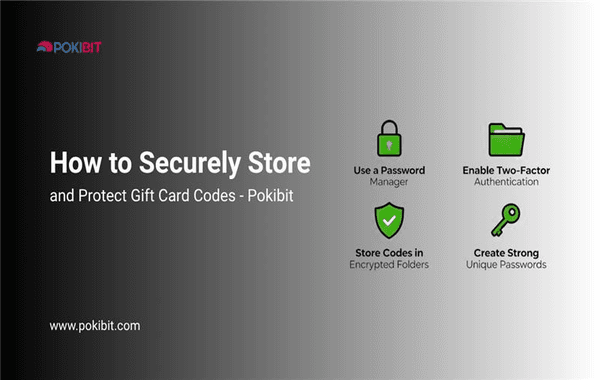
In today’s digital-first shopping world, gift cards have become a convenient and versatile way to pay, gift, and enjoy premium content across games, stores, and entertainment platforms. Whether you’ve purchased one for yourself or received it as a gift, protecting your gift card codes is crucial to prevent loss, theft, or misuse. Many users overlook this simple yet essential step, leading to accidental loss of value.
In this detailed guide, we’ll explore smart and effective ways to Securely Store and Protect Gift Card codes, ensuring your balance and rewards remain safe. And if you’re looking to buy or top up gift cards securely, platforms like Pokibit.com provide a trusted and smooth experience for your digital purchases.
Gift cards—whether they’re for gaming, shopping, or entertainment—essentially work as digital cash. Once the code is redeemed, it cannot be recovered if stolen or leaked. Cybercriminals often target online users who store codes carelessly, making digital protection a serious concern.
A 2024 cybersecurity report by Norton found that one in four online shoppers experienced digital theft or phishing scams involving e-gift cards. Moreover, most victims admitted to saving their codes in unsecured places like chat apps or screenshots.
Your gift card represents real value, so safeguarding it should be as important as securing your debit card or digital wallet.
One of the most common mistakes users make is sending or storing gift card codes via unsecured platforms like social media, chat apps, or public emails. These platforms may not use end-to-end encryption, allowing potential data leaks or unauthorised access.
Instead:
The safest way to Securely Store and Protect Gift Card information is by using a digital wallet or an encrypted password manager. Tools like Google Password Manager, 1Password, or LastPass offer encrypted storage for sensitive data, including gift card codes.
Benefits include:
These tools make managing multiple codes easy—especially for gamers or users who purchase in bulk.
If you purchase your cards online from trusted platforms like Pokibit, you’ll receive your digital code via email. Instead of leaving it buried in your inbox, create a dedicated “Gift Cards” folder.
To make it safer:
By organising your digital cards properly, you minimise the risk of losing access or accidentally deleting the mail.
Many users delay redeeming their cards, assuming they’ll use them later. However, unredeemed cards are at a higher risk of theft or misplacement.
If you’ve purchased or received a gift card, it’s best to:
For instance, if you buy a PlayStation or Razer Gold gift card, redeem it immediately to link the funds securely to your account.
Fake redemption sites are increasingly common. They lure users with “bonus offers” or “instant rewards” and then steal card details once entered.
To stay safe:
Buying from verified and FIU-compliant platforms like Pokibit ensures your card and payment data remain secure.
If you have a physical card, store it as carefully as you would a debit or credit card. Physical theft or damage can lead to a total loss of value.
To keep your physical cards safe:
Remember: once the code is exposed, it’s vulnerable to unauthorised use.
Many digital stores now offer additional account security tools, such as:
These features make it much harder for anyone to use your gift card or balance without your knowledge.
While you shouldn’t share your code, it’s smart to maintain a personal record. Note down:
If a card doesn’t work or gets lost, this information helps customer support trace your transaction and reissue your card (if possible).
Counterfeit or stolen cards are a common issue in the online market. Always buy from official retailers or verified third-party platforms like Pokibit.com, which ensure authenticity and secure payment handling.
When buying in bulk for corporate or personal use, check if the platform offers:
Pokibit provides a smooth checkout process, secure transactions, and verified sources for all major brands—making it ideal for those who frequently buy gift cards.
Finally, make it a habit to monitor your gift card activity. Many platforms allow you to check your balance online or view transaction history. This not only helps you keep track of your spending but also alerts you to any suspicious deductions.
Pokibit is a trusted platform for buying, managing, and redeeming digital gift cards securely. Every transaction is encrypted and backed by strong compliance with Indian financial guidelines.
From gaming top-ups like Razer Gold or PlayStation to store vouchers and entertainment credits, Pokibit ensures quick delivery and genuine codes every time. Whether you’re buying for yourself or gifting others, you can rest assured your digital value is protected.
Don’t risk losing your valuable gift cards to scams or poor storage habits. Visit Pokibit.com today to buy authentic digital gift cards with instant delivery and guaranteed security. Protect your codes, enjoy your rewards, and make every purchase safe and rewarding with Pokibit.

Roblox Gift Cards Buying Tips Every Indian Player Must Know in 2026

Best Ways to Purchase Moba Legends Diamonds with Maximum Value
Google Play USD Gift Card Redemption, Pricing, Safety and Best Denominations
Google Play Gift Card (USD) Benefits: Instant Top-Ups Across Multiple Apps & Games

Chamet Diamonds Top-Up Guide: Boost Your Live Gifts and Ranking

Honkai Star Rail Top-Up FAQ: Common Questions on UID and Payments India

Google Play (USD) Gift Card Best Deals: Compare Prices with UPI Discounts

Everything About Poppo Live Coins (Global) Top-Up Rates and Safe Methods

Steam Wallet Gift Cards Benefits: Unlimited PC Games and DLC Access

Unlock Epic Skins: Benefits of Moba Legends Diamonds Top-Up in 2026
